GA4 BigQuery SQL: DATE, DATETIME, and TIMESTAMP Data Wrangling
Welcome to another exciting chapter of our GA4 BigQuery SQL Course!
In this section, we’ll dive into the intricacies of wrangling DATE, DATETIME, and TIMESTAMP data types.
Understanding how to work with date-time-related data is essential for extracting meaningful insights from your GA4 datasets.
We’ll explore common operations, transformations, and best practices to elevate your data analysis skills.
GA4 data contains timestamps and dates that are crucial for analyzing user behavior over time. Properly handling and manipulating date and time data is key to uncovering valuable insights.
Let’s start by extracting data from the sample dataset.
-- bigquery-public-data.ga4_obfuscated_sample_ecommerce
SELECT event_timestamp
FROM `bigquery-public-data.ga4_obfuscated_sample_ecommerce.events_20210131`
ORDER BY event_timestamp DESC
LIMIT 1
This query will produce one row from the event_timestamp column which is of INTEGER data type:
| event_timestamp |
|---|
| 1612137595412363 |
We will use this value (statically) to explore several functions related to date and time manipulation.
event_timestampis the unix timestamp in microsecond precision at which the event was sent to GA4.
Casting event_timestamp to TIMESTAMP
To work with timestamps effectively, we’ll first convert the event_timestamp from an integer to a TIMESTAMP data type:
-- Using the event_timestamp value from the above query
SELECT TIMESTAMP_MICROS(1612137595412363) AS event_timestamp_utc
The TIMESTAMP_MICROS() function converts the INTEGER value to a TIMESTAMP with microsecond precision:
| event_timestamp_utc |
|---|
| 2021-01-31 23:59:55.412363 UTC |
Now you see the human readable version of the event_timestamp.
Note that the TIMESTAMP data type always has a UTC timezone.
Convert event_timestamp UTC to Local Timezone
To be able to convert UTC to local timezone, we need to convert TIMESTAMP object to DATETIME object using DATETIME() function.
DATETIME() function supports an optional parameter to specify a time zone:
DATETIME(timestamp_expression [, time_zone])If no time zone is specified, the default time zone, UTC, is used. See this Wikipedia article to see the list of database time zones.
Here’s an example query on how to use the DATETIME() function:
-- Using the event_timestamp value from the above query
SELECT
    TIMESTAMP_MICROS(1612137595412363) AS event_timestamp_utc,
DATETIME(TIMESTAMP_MICROS(1612137595412363), 'Asia/Jakarta') AS event_datetime_jkt| event_timestamp_utc | event_datetime_jkt |
|---|---|
| 2021-01-31 23:59:55.412363 UTC | 2021-02-01T06:59:55.412363 |
Here, we constructs a DATETIME object using a TIMESTAMP object. In this example, we convert event_timestamp value from UTC to ‘Asia/Jakarta’ timezone, which is UTC+7.
We can also get only the DATE part using DATE() function:
-- Using the event_timestamp value from the above query
SELECT DATE(TIMESTAMP_MICROS(1612137595412363), 'Asia/Jakarta') AS event_date_jkt
Adding Intervals to DATE and DATETIME
You can add or subtract intervals from DATE data using DATE_ADD() and DATE_SUB() functions:
-- Using the event_timestamp value from the above query
SELECT
    DATE(TIMESTAMP_MICROS(1612137595412363), 'Asia/Jakarta') AS event_date_jkt,
    DATE_SUB(DATE(TIMESTAMP_MICROS(1612137595412363), 'Asia/Jakarta'), INTERVAL 7 DAY) AS event_date_jkt_sub_7,
DATE_ADD(DATE(TIMESTAMP_MICROS(1612137595412363), 'Asia/Jakarta'), INTERVAL 7 DAY) AS event_date_jkt_add_7| event_date_jkt | event_date_jkt_sub_7 | event_date_jkt_add_7 |
|---|---|---|
| 2021-02-01 | 2021-01-25 | 2021-02-08 |
Similarly, you can manipulate DATETIME data using DATETIME_ADD() and DATETIME_SUB() functions:
-- Using the event_timestamp value from the above query
SELECT
    DATETIME(TIMESTAMP_MICROS(1612137595412363), 'Asia/Jakarta') AS event_datetime_jkt,
    DATETIME_SUB(DATETIME(TIMESTAMP_MICROS(1612137595412363), 'Asia/Jakarta'), INTERVAL 7*24 HOUR) AS event_datetime_jkt_sub_24_7,
    DATETIME_ADD(DATETIME(TIMESTAMP_MICROS(1612137595412363), 'Asia/Jakarta'), INTERVAL 7*24 HOUR) AS event_datetime_jkt_add_24_7
Parsing _TABLE_SUFFIX as DATE
In our previous course section about Querying Wildcard Tables, we learned how to efficiently query data from multiple event tables. Now, let’s take it a step further by parsing the _TABLE_SUFFIX as a DATE using the PARSE_DATE() function.
Why Parse as DATE?
When dealing with GA4 data, the daily event tables are created based on the timezone you’ve set for reporting. This means that the _TABLE_SUFFIX represents dates in a specific timezone.
By parsing _TABLE_SUFFIX as DATE, we gain the ability to perform date-based filtering directly on the table suffix itself, making our queries more robust and versatile.
Instead of using
STRINGin theWHEREcondition:WHERE _TABLE_SUFFIX BETWEEN '20210115' AND '20210116';We can parse it as
DATE:WHERE PARSE_DATE("%Y%m%d", _TABLE_SUFFIX) BETWEEN '2021-01-15' AND '2021-01-16';
The daily event tables (
_TABLE_SUFFIX) are created according to the timezone you set for reporting.
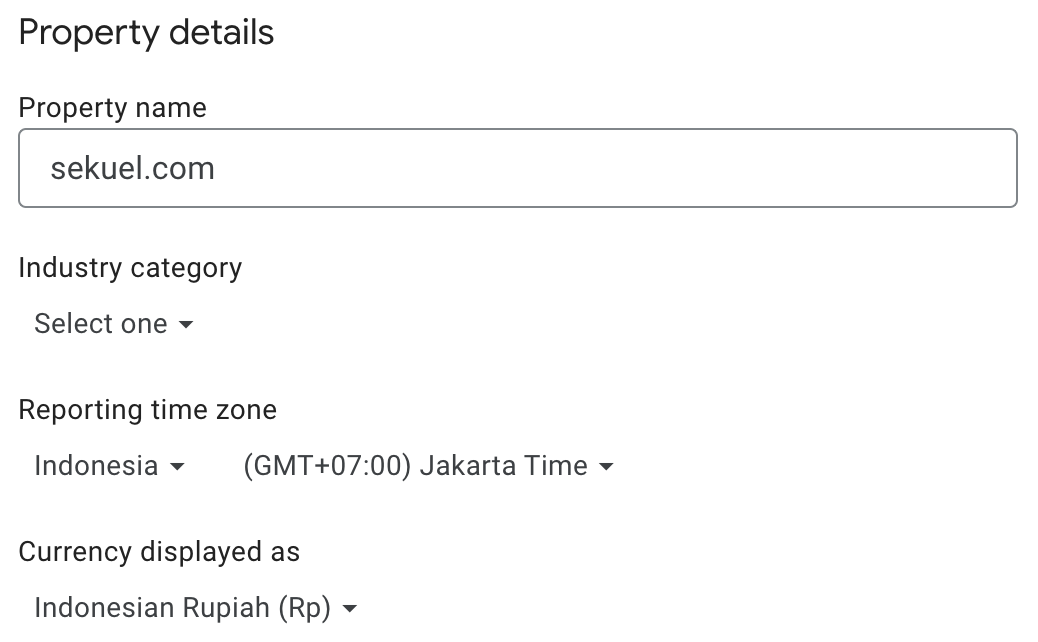
And by parsing the _TABLE_SUFFIX as DATE, will allow us to get, for example, the last 7 days data:
-- bigquery-public-data.ga4_obfuscated_sample_ecommerce
SELECT *
FROM `bigquery-public-data.ga4_obfuscated_sample_ecommerce.events_*`
WHERE PARSE_DATE("%Y%m%d", _TABLE_SUFFIX)
    BETWEEN DATE_SUB(CURRENT_DATE('Asia/Jakarta'), INTERVAL 7 DAY) AND CURRENT_DATE('Asia/Jakarta')
-- ! This query will yield no result because of the sample data limitation.
To get the above query working for events_intraday_YYYYMMDD tables, we can modify it like this:
WHERE PARSE_DATE("%Y%m%d", REGEXP_EXTRACT(_TABLE_SUFFIX, "[0-9]+"))Parsing _TABLE_SUFFIX as DATE enhances query flexibility, allowing you to perform complex date-based operations directly within your SQL queries. This empowers you to filter, aggregate, and analyze your GA4 data with precision, regardless of the timezone configurations.
As you progress in our GA4 BigQuery SQL Course, you’ll discover how to leverage such advanced techniques to extract deeper insights from your GA4 datasets.